Caudal
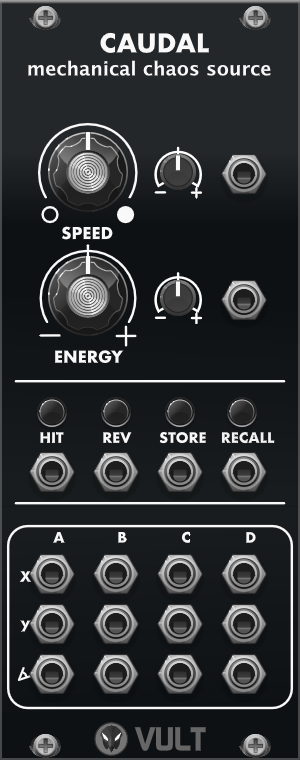
Caudal is a chaotic source that is based on the model of a multi segment pendulum (see the video below). The core of Caudal is a detailed simulation of the pendulum system from which we can get measurements like the angular velocities and positions of the segments. These measures produce very natural oscillations that are interrelated due to the nature of the system.
I made the original model using SystemModeler and later applied manual optimizations to improve the performance and be able to run it in real time.
Documentation
- Speed: defines how fast the pendulum swings. To the left the pendulum moves slowly, to the right it moves fast.
- Energy: changes some of the properties of the model, for example the gravity and mass. The effect is that the pendulum moves more (or less) aggressively. This parameter can be used to produce variations to the movement.
- Hit: when triggered, defines a new initial position of the pendulum and new angular velocities. When triggered many times it can make the pendulum rotate continuously.
- Rev: reverses the angular velocities of the pendulum, which makes all the segments move in the exact opposite direction to the one they are going.
- Store: saves the current state of the pendulum (positions and velocities).
- Recall: returns the pendulum to the stored state.
- Mode: cycles through the three simulation models. The LEDs next to the button show which one is selected, and the model can also be picked from the right-click menu.
- Pendula: the multi segment pendulum described above.
- Planets: four bodies attracting each other through gravity, which produces slower and wider orbits.
- Fish-Tank: four bodies bouncing around inside a container, which produces more nervous and irregular movement.
All three models drive the same four sets of outputs, so switching model changes the character of the movement without changing how the module is patched.
Modulation
The small knobs next to Speed and Energy are attenuverters for the two CV inputs below them, so both parameters can be modulated from the patch. Hit, Rev, Store and Recall each have a trigger input below the button.
Outputs
For each of the four bodies (columns A to D) there are the following 3 outputs:
- X: horizontal position of the body (normalized from -5 V to 5 V).
- Y: vertical position of the body (normalized from -5 V to 5 V).
- ∠: angle of the body (normalized from -5 V to 5 V).
Videos
Help improve this manual here.