Dopamine
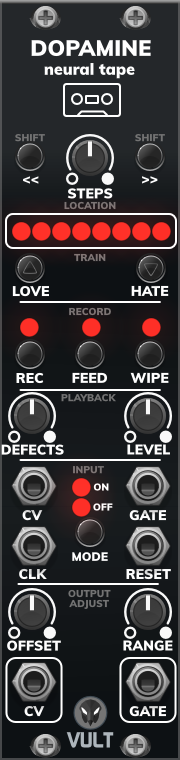
Dopamine is based on the idea that, every time we recall one of our memories our brain reconstructs the events rather than just recalling them. Our brain is an imperfect medium of storage where our memories can get confused or we can forget parts of the story.
Dopamine simulates this behavior by using different layers of virtual neurons. These neurons will try to store CV and Gate information and they will recall it as best as they can. The neurons can be trained by rating when we Love or Hate a sequence.
Basic Use
Recording
To record your own input, first, provide a clock signal into the CLK input and the data you want to record in the CV and GATE inputs. Select how long you want the sequence to be using the STEPS control. Pressing the REC button will arm the machine and the LED will turn light red. When the sequence ends, the recording will start and the LED will be full red. Once the sequence ends, the recording will stop.
By default, Dopamine records only the input but you will be listening to the output as well (with defects included). If you want to record the output, you need to enable the feedback by pressing the FEED button.
You can record information into the neurons multiple times. In this case, the memories are gonna be merged and the neurons will come up with variations of the recordings during playback.
We can clear the data by pressing the WIPE button. Pressing it will delete layer by layer of the neurons and the LED will blink every time there’s deletion. If there are no more layers to delete, the LED will not blink.
Playing Back
The machine is continuously playing back sequences. The sequences are obtained by requesting information to the neurons. Even when there’s nothing recorded the machine will produce an output that may or may not be defective. The output can be controlled by the DEFECT and LEVEL knobs. The defect control can be seen as a probability of generating wrong data. This can be used to introduce variations to the patterns. At 0% the tape will produce recorded information only, while at 100% the output will be highly “invented” by the neurons. The amount of variation can be controlled by the LEVEL parameter which constrains (in Volts) the maximum deviation.
The sequence can be reset by providing a pulse in the RESET input. If you don’t like where the sequence starts, you can shift the start point with the left and right SHIFT buttons.
The current location is displayed using the eight LEDs. The location is displayed proportionally to the number of steps. For example, if we use 64 steps, the first 8 will be displayed by the first LED.
You can provide an input at the same time you are playing back. Every time there’s an input GATE you will be able to listen to the data you are providing. If you want to ignore your input, you can turn it off by pressing the MODE button.
Training the Neurons
We can influence the memories of our neurons by providing feedback with the LOVE or HATE buttons. These buttons rate the previously output sequence. If we like the previous sequence, pressing the LOVE button will tell the neurons that we liked the sequence we heard and it is gonna learn to provide similar sequences. The HATE button does the opposite. It will train the neurons to avoid the previously played sequence. It will take a few presses of LOVE/HATE until you start hearing the effect in the output sequence.
You have to consider that the output is at every moment affected by the value of the DEFECTS knob.
Adjusting the Output Signal
The OFFSET and RANGE control can be used to modify the output signal. As their names imply, OFFSET will introduce a constant voltage level to the output, while RANGE will change the values by multiplying them by a constant.
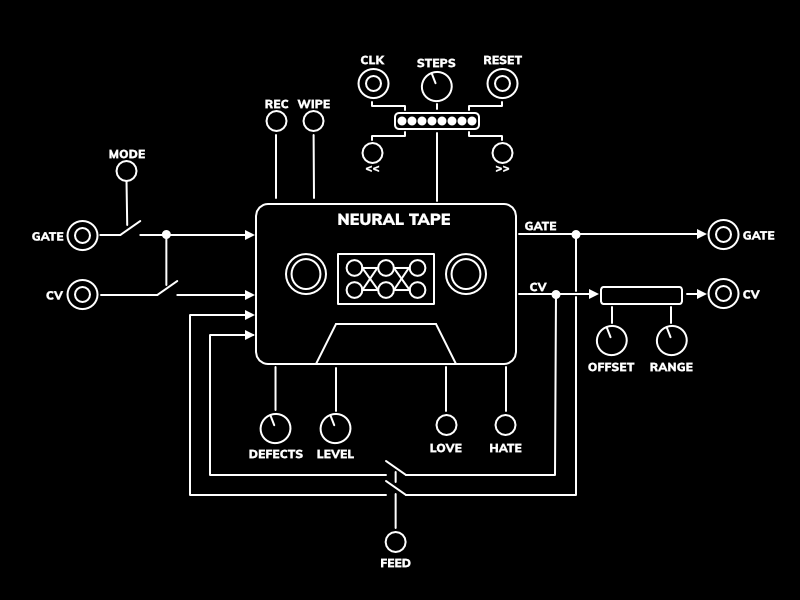
Control Description
Location
- Steps: defines the length of the sequence in steps, from 1 to 64.
- Shift (Left and Right): change the starting point of the sequence by one step.
- Location LEDs: display the current playback location according to the number of steps.
Train
- Love: train the neurons by reinforcing the previously output sequence.
- Hate: train the neurons by discouraging the previously output sequence.
Record
- Rec: arms the recording to start capturing data in the start of the next sequence.
- Feed: if enabled, Dopamine will record its own output merged with the provided input.
- Wipe: erases (layer by layer) the information of the neurons.
Playback
- Defects: controls the level of misinformation the neurons produce.
- Level: constrains the maximum level of deviation that the defects can have.
Output Adjust
- Offset: adds a constant level of voltage to the output. This goes from -5 V to 5V.
- Range: multiplies by a constant level the output. This goes from 0 to 2x.
Inputs and Outputs
- Mode: turns On or Off the input.
- Reset: returns the read/record head to the initial step.
- Clk: Moves the read/record head one step forward.
- Gate and CV (Inputs): main inputs used to record information into the neurons.
- Gate and CV (Outputs): main outputs of the machine.
Help improve this manual here.