Overon 2V
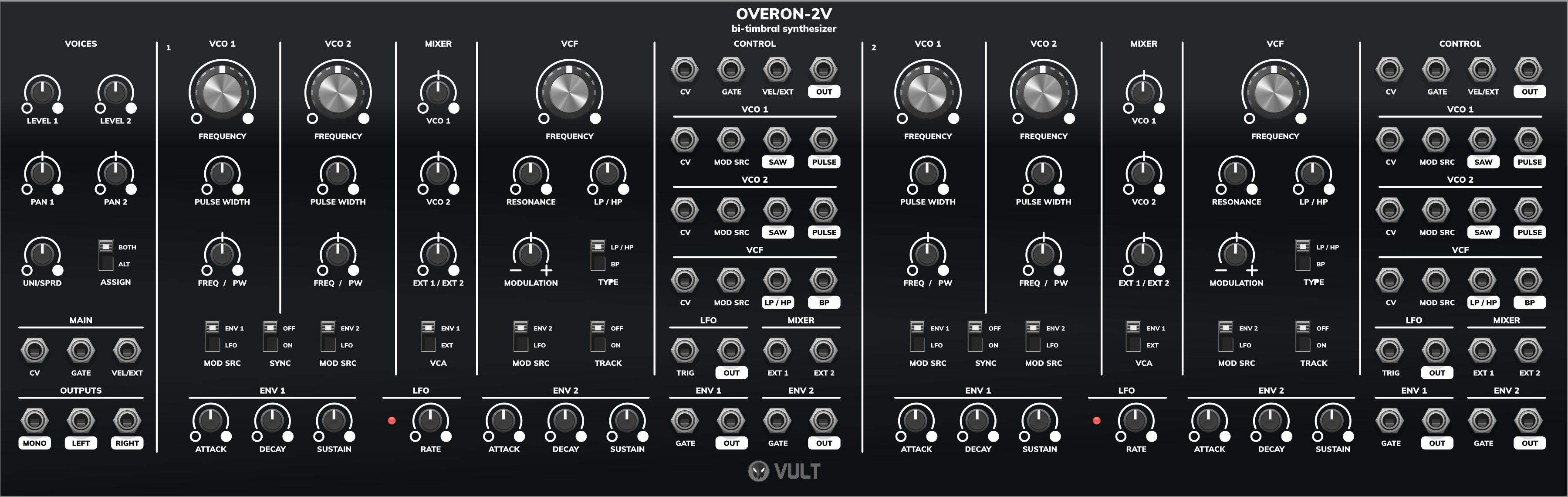
Overon 2V is a bi-timbral synthesizer: two complete Overon voices in a single module, with a small mixer section that combines them into a stereo output.
Each of the two voices is exactly the module described in the Overon page: two oscillators, a state variable filter, two envelopes, an LFO, a mixer and a VCA, with all the stages exposed on their own jacks. The section below only covers what Overon 2V adds on top of that.
Documentation
Voices
- Level 1 and Level 2: output level of each voice in the stereo mix.
- Pan 1 and Pan 2: stereo position of each voice.
- Uni/Sprd: spreads the two voices apart in both pitch and pan. At zero the voices are in unison and centered; turning the knob up detunes them against each other and pushes them to opposite sides of the stereo field. This is the quickest way of turning the two voices into a single fat sound.
- Assign: selects how incoming notes are distributed.
- Both: both voices play every note. Combined with Uni/Sprd, this gives a two-oscillator-per-note unison patch.
- Alt: notes are assigned alternately to voice 1 and voice 2, which allows the release of one note to overlap the attack of the next, and lets each voice be programmed with a different timbre.
Main inputs
- CV: main 1V/oct input, distributed to the voices according to the Assign switch.
- Gate: main gate, distributed the same way.
- Vel/Ext: velocity, or direct VCA control, shared by both voices.
Each voice also keeps its own CV, Gate and Vel/Ext inputs, which take priority over the main ones. Patching them turns Overon 2V into two independent voices.
Outputs
- Mono: both voices summed, ignoring the pan controls.
- Left and Right: both voices, panned.
The individual Out jack of each voice is still available, so the two halves can also be processed separately before leaving the module.
Context menu
Right-clicking Overon 2V gives control over how the randomize command treats the two voices, which is what makes randomization usable on a bi-timbral module.
Randomization groups
Each of these can be turned off so that randomizing leaves that part of the module alone.
- Randomize Voice 1 and Randomize Voice 2: include or exclude each voice. Turning one off lets you keep a patch you like on one voice while rolling the dice on the other.
- Randomize Voice Controls: includes the Level, Pan, Uni/Sprd and Assign settings. Turn it off to keep your stereo layout while the timbres change.
Actions
- Copy Voice 1 to Voice 2 and Copy Voice 2 to Voice 1: duplicates every setting of one voice onto the other. This is the quickest way into a unison patch: copy one voice across, then use Uni/Sprd to detune and spread the pair.
Help improve this manual here.